Key Concepts
Tasks and Workflows
A task is some activity that a user must complete to accomplish a simulation pre- or post-processing objective (e.g., generating a geometric model of a simulation domain, associating attributes to model geometry, meshing a model, exporting a simulation input deck, submitting a simulation job, post-processing simulation results). Each task has state that indicates how complete it is. Tasks may reference other tasks as dependencies, which means the referenced tasks must be completed (or at least completable) before their dependent tasks may be undertaken by the user. Finally, a task may pass configuration data to downstream tasks and accept configuration data from upstream tasks via ports.
The graph of tasks (with dependencies as arcs) indicates what tasks a user may work on, what tasks are incomplete, and what tasks cannot be performed because of unmet dependencies.
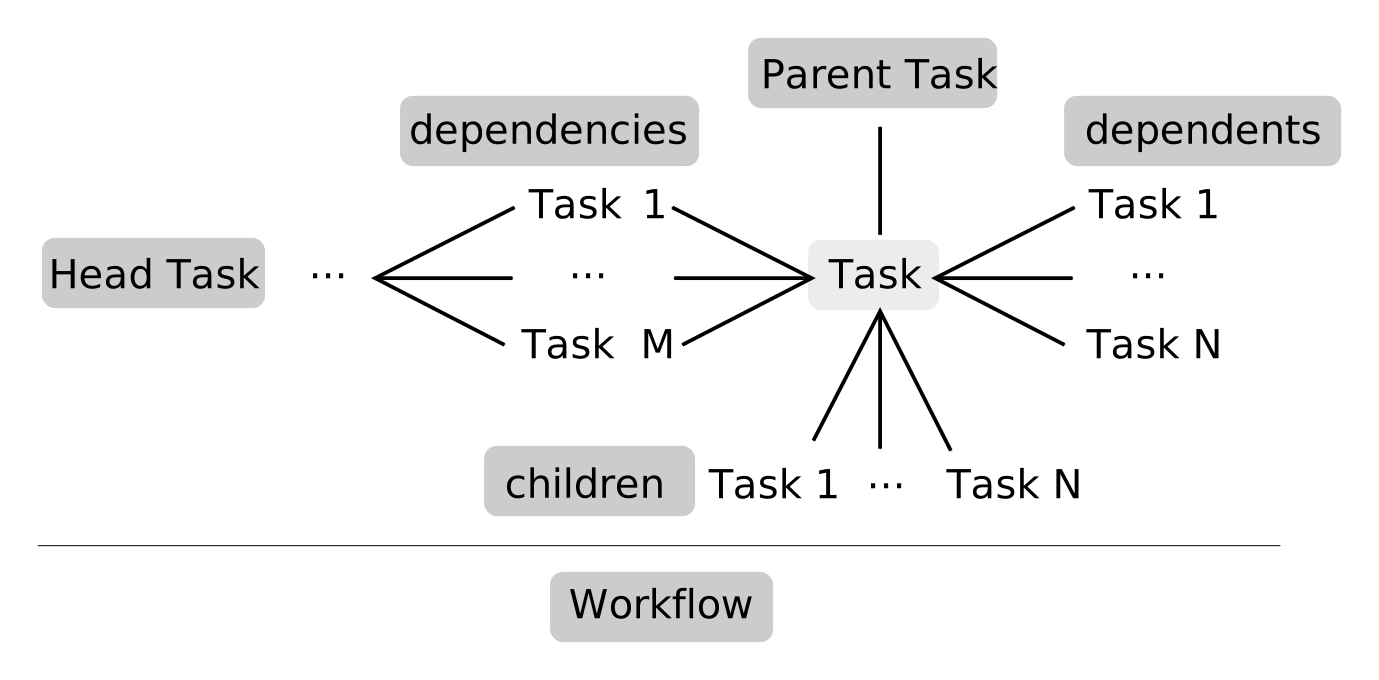
It is possible to have multiple, disjoint graphs of tasks. Each connected component is called a workflow or pipeline.
A task becomes active when its dependencies are met and the user chooses to focus on the task. An application can compute the set of tasks which users are allowed to focus on (make active) by cutting the graph along arcs that connect completed tasks to incomplete tasks. When a task becomes active, the application will generally change its appearance and functionality to aid the user in performing the task. The visual style adopted by the application should be guided by the style class-names (arbitrary, author-defined strings) assigned (by the task author) to the task.
Tasks are allowed to have children. When a task has children, the children form a workflow with one or more head tasks and may not have dependencies on external tasks (i.e., on tasks that are not children of the same parent). The parent task should configure its children and its internal state should be some function of the state of its children. To work on a child task, the user must first make the parent task active and may then make one of the children head-tasks active.
Note that a workflow may have multiple “head” tasks (i.e., tasks without dependencies whose dependents reference all of the head tasks).
- State
is an enumeration of the states a task may take on. Tasks are unavailable until dependencies are met; then they are incomplete until the task’s condition is met; then they are completable (but not completed) until the user marks the task as complete.
- Task
instances have dependent tasks and a flag to store whether the user has marked a given task as complete. You may observe task state transitions. You should subclass this to implement logic that determines whether your task is unavailable, incomplete, or completable; the base class is unavailable until its dependencies are met, at which time it will transition straight to completable.
- Port
instances may serve as either an input or an output for configuration data. A task may be asked to produce PortData for any of its output ports and will be informed when any of its input ports have been updated. Each port indicates the type of data it accepts (for input ports) or produces (for output ports).
- Agent
instances are assigned to a task and affect its state, the data ingested from its input ports, the data broadcast on its output ports, and its availability to users. Agents may also override the way a task’s child-tasks affect its state.
- Task instance-tracker and factory
is used to create instances of registered task classes. Any plugins that provide new Task subclasses should register those classes with the factory in their registrar (see SMTK’s Plugin System).
- Active
is used to get the currently active task or switch to a different task. There can only be one active task at a time, although there may be no active task. Active tasks must be managed instances so that there is some indication before deletion that the task will be destroyed and thus should not be active. This object can be observed for changes to the active task.
- Agent factory
is used to create instances of registered agent classes. Any plugins that provide new Agent subclasses should register those classes with the factory in their registrar (see SMTK’s Plugin System).
- Adaptor
instances configure a “downstream” task when the “upstream” task changes state. This way, information provided by the user can have an effect on the state and user-interface of subsequent tasks. You should subclass this to implement logic that determines what information should be transmitted from one task to another.
- Adaptor instance-tracker and factory
is used to create instances of registered adaptor classes. Any plugins that provide new Adaptor subclasses should register those classes with the factory in their registrar (see SMTK’s Plugin System).
- Manager
is an object applications can create to hold a task factory and the set of task instances the factory has created. It also holds the active task tracker.
- Pipelines
are tasks that form a directed acyclic graph of dependencies. There is no explicit class representing pipelines since they can be produced by visiting related (dependent) Task instances given the task(s) at the “head” of the pipeline (i.e., tasks with no dependencies).
Instead of providing an explicit representation of pipelines, SMTK provides observers for changes to the set of pipeline head tasks. The task Instances class has a
workflowObservers()method that you may use to be informed of workflow events.
Dependency and Adaptor Details
Dependencies and adaptors provide similar but distinct functionality:
Dependencies are administrative (rather than technical) barriers which prevent users from working on downstream tasks until the upstream dependencies are met.
Adaptors generally serve as technical barriers; generally, a downstream task will be unavailable until it is properly configured by user actions when working on an upstream task.
Adaptors may not always act as barriers in a workflow; it may be that the downstream tasks are configured such that they are always available to users. In these cases, adaptors often improve the user experience by enforcing consistency in the state of a workflow.
There are times where you (as a workflow designer) may want both a dependency and an adaptor connecting the same pair of tasks. This is perfectly valid since they serve different purposes.
A task’s dependencies may be treated as strict or lax. When dependencies are strictly enforced, the task is unavailable until all its dependencies are marked completed. When dependencies are lax, the task may be made active as long as all its dependencies are completable (but not necessarily marked completed). The default is for dependencies to be laxly enforced. You can configure this on a per-task basis, but not a per-dependency basis. See the Task::state() documentation for a state table comparison of strict and lazy dependency evaluation.
Task Worklets and Task Galleries
There are times when a user will need to interactively extend a task workflow by adding a tasks or a group of related tasks. SMTK provides this functionality with worklets. A worklet is defined as an object representing a template for a set of tasks that can be instantiated to reuse some portion of a workflow. In SMTK, a worklet is a subclass of smtk::resource::Component and its instances are held by a project’s smtk::task::Manager.
Worklets can be versioned with a schema type and version number so that they and the workflows into which they are instantiated can be processed by updaters (see update::Factory).